Introduction to cisstStereoVision Filters and Streams
Filters
Streams
Samples
Inputs and Outputs
Connections
Example 1 - A Simple Stream
Code under git repository: cisstStereoVision/examples/tutorial1/CMakeLists.txt
cmake_minimum_required (VERSION 3.16)

# create a list of libraries needed for this project
set (REQUIRED_CISST_LIBRARIES cisstCommon cisstVector cisstOSAbstraction cisstMultiTask cisstStereoVision)

# find cisst and make sure the required libraries have been compiled
find_package (cisst REQUIRED ${REQUIRED_CISST_LIBRARIES})

if (cisst_FOUND)

  add_executable (svlExTutorial1 main.cpp)
  set_property (TARGET svlExTutorial1 PROPERTY FOLDER "cisstStereoVision/examples")
  target_link_libraries (svlExTutorial1 ${REQUIRED_CISST_LIBRARIES})

else (cisst_FOUND)
  message ("Information: code in ${CMAKE_CURRENT_SOURCE_DIR} will not be compiled, it requires ${REQUIRED_CISST_LIBRARIES}")
endif (cisst_FOUND)
Code under git repository: cisstStereoVision/examples/tutorial1/main.cpp

void SimpleStream()
{
    svlStreamManager stream;                        // 2. Instantiate SVL Stream
    svlFilterSourceVideoCapture source(1);          // 3. Instantiate video capture filter
    svlFilterImageWindow window;                    // 4. Instantiate image window filter

    source.SetDevice(0);                            // 5. Select first available capture device

    stream.SetSourceFilter(&source);                // 6. Assign source filter to stream
    source.GetOutput()->Connect(window.GetInput()); // 7. Connect source filter to window filter

    stream.Play();                                  // 8. Initialize and Play video stream

    char ch;
    std::cin >> ch;                                 // (Wait for key-press)

    stream.Release();                               // 9. Release stream
}
Stream Source
cisstStereoVision has a built in support for stereoscopic capture and processing. Video capture filters may take an unsigned int argument in the constructor that specifies the number of parallel video channels to be handled together in one stream.
Please note: The architecture supports any number of video channels within a stream, however in the current implementation capture filters support only 1 or 2 video channels.
// stereo stream
svlFilterSourceVideoCapture source_s(2);
source_s.SetDevice(0, 0, SVL_LEFT);             // device=0, input=0, channel=LEFT
source_s.SetDevice(1, 0, SVL_RIGHT);            // device=1, input=0, channel=RIGHT

// mono stream
svlFilterSourceVideoCapture source_m(1);
source_m.SetDevice(2);                          // device=2, input=0, channel=LEFT
Assembling the Graph
// First the source filter needs to be assigned to the stream
stream.SetSourceFilter(&source);

// Then filters need to be connected by establishing connections between their input and output ports
source.GetOutput()->Connect(filter1.GetInput());
filter1.GetOutput()->Connect(filter2.GetInput());
Accessing Inputs and Outputs
The methods GetInput and GetOutput take one optional std::string & argument. If the argument is omitted then the methods return a pointer to the synchronous input or synchronous output port of the filter. If the argument is specified, then the methods look up the input or output that has the same name as the specified string argument. The specified name may correspond to either synchronous or asynchronous port.
// Establishing 'synchronous' connection
filter1.GetOutput()->Connect(filter2.GetInput());

// Establishing 'asynchronous' connections
filter1.GetOutput("output2")->Connect(filter2.GetInput());
filter2.GetOutput()->Connect(filter3.GetInput("input2"));
filter3.GetOutput("output2")->Connect(filter4.GetInput("input2"));
Example 2 - Stream with Splitter
Code under git repository: cisstStereoVision/examples/tutorial1/main.cpp
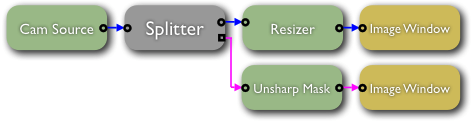
void ProcessingStream()
{
    svlStreamManager stream;                                      // 2. Instantiate SVL Stream
    svlFilterSourceVideoCapture source(1);                        // 3. Instantiate video capture filter
    svlFilterSplitter splitter;                                   // 4. Instantiate stream splitter filter
    svlFilterImageResizer resizer;                                // 5. Instantiate image resizer filter
    svlFilterImageUnsharpMask sharpen;                            // 6. Instantiate unsharp masking filter
    svlFilterImageWindow window;                                  // 7. Instantiate first image window filter
    svlFilterImageWindow window2;                                 // 8. Instantiate second image window filter

    source.SetDevice(0);                                          // 9. Select first available capture device

    splitter.AddOutput("async_out");                              // 10. Add 2nd output to stream slitter filter

    resizer.SetOutputSize(400, 300);                              // 11. Setup image resizer filter

    sharpen.SetAmount(200);                                       // 12. Setup unsharp masking filter
    sharpen.SetRadius(5);
    sharpen.SetThreshold(2);

    stream.SetSourceFilter(&source);                              // 15. Assign source filter to stream
    source.GetOutput()->Connect(splitter.GetInput());             // 16. Connect source filter to splitter filter
    splitter.GetOutput()->Connect(resizer.GetInput());            // 17. Connect splitter output #1 to resizer filter
    resizer.GetOutput()->Connect(window.GetInput());              // 18. Connect resizer filter to 1st window filter

    splitter.GetOutput("async_out")->Connect(sharpen.GetInput()); // 19. Connect splitter output #2 to unsharp masking filter
    sharpen.GetOutput()->Connect(window2.GetInput());             // 20. Connect unsharp masking filter to 2nd window filter

    stream.Play();                                                // 21. Initialize and Play video stream

    char ch;
    std::cin >> ch;                                               // (Wait for key-press)

    stream.Release();                                             // 22. Release stream
}
Assembling the Graph
// After instantiation of the splitter filter
// it only has one default synchronous output
svlFilterSplitter splitter;

// By calling the AddOutput() method, you can
// create any number of synchronous outputs on
// the splitter. Each output on a single splitter
// needs to have a unique name.
splitter.AddOutput("out2");
splitter.AddOutput("out3");

filter1.GetOutput()->Connect(splitter.GetInput());

// Connect the synchronous output of the splitter
// by omitting the argument when calling GetOutput()
splitter.GetOutput()->Connect(filter2.GetInput());

// In order to connect aynchronous outputs, the
// output names need to be specified
splitter.GetOutput("out2")->Connect(filter3.GetInput());
splitter.GetOutput("out3")->Connect(filter4.GetInput());