Tutorial
Part 1 - Intro to CISST, Subversion, CMake; Creating CISST projects; Intro to Filters and Streams
Part 2 - Filters, streams, samples, input/outputs, connections, a couple simple examples
Part 3 - Threading recap, available filters, image window event handling, examples
Part 4 - Image window event handling, creating custom filters, examples
Part 5 - Creating custom filters, multithreading, splitter filter, examples
Part 6 - Image overlays, examples
Introduction
cisstStereoVision (SVL) is part of the cisst libraries
Object-Oriented (C++) API and component based
Optimized for real-time stream (image and other) processing and visualization
Cross-platform (Windows, Linux, Mac OS X), open source (see cisst license)
Single interface for accessing a wide variety of video capture and display devices
Supports most important image and video file formats
Multi-threaded, but keeps coding simple for users
Features cross-network live video streaming
Several processing functions already implemented
Easy to add custom processing
Compatible with OpenCV
In development: iOS platform support, GPU processing
Processing Architecture
Processing elements are called filters
Build algorithms by creating a directed graph of filters

SVL streams vs. pipelines: How to achieve low latency?
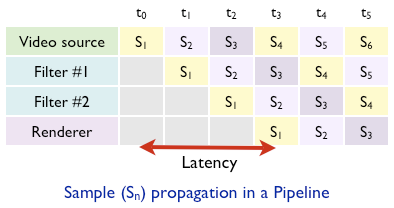
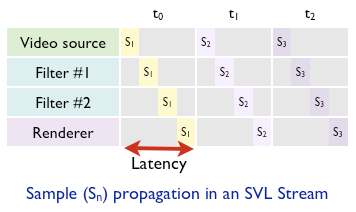
Processing in SVL is performed in streams instead of pipelines.
Pipeline:
Each filter has its own thread(s)
A data sample can only be processed by one filter at a time
Different filters perform processing simultaneously on different data samples
Simultaneously running filters have to share CPU resources
SVL Streams:
A linear chain of connected filters is called a stream, which is managed by the stream manager
Filters don’t have their own threads, instead a stream manager owns multiple threads
The stream manager concentrates all CPU resources on a single filter at a time
Once a filter finished processing, the stream manager starts processing the next filter in the graph
Comparison:
In a graph of parallelized X filters, both the pipeline and the SVL stream perform the same amount of computation in a given amount of time.
However the pipeline needs X times more time to process a single sample than the SVL stream, because it processes X samples simultaneously.
Pros and Cons of SVL stream
Pros:
Lowest possible latency
Better L3 cache hit performance because all cores work on the same sample
Cons:
Individual filters need multi-threaded implementation
Threads need to be synchronized after each filter
Data Samples
Sample is the unit of data that is passed along in the stream
Implemented as C++ classes derived from
svlSamplebase classSamples may carry a variety of payload types (
svlSampleImage,svlSampleMatrix,svlSampleText, etc.)Each and every sample is time stamped
They have built in serialization & deserialization for easy I/O
Filter Inputs and Outputs
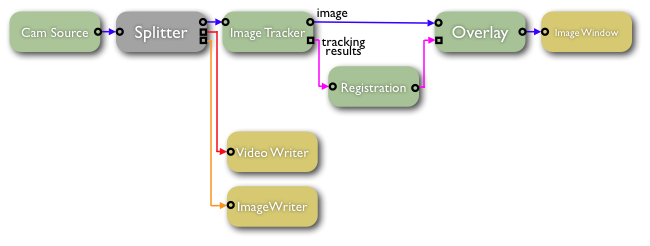
Filters have input and output ports
Filter graph topology is defined by how the filter inputs and outputs are connected
A special class of filters are called source filters, these do not need to have inputs but only outputs
Each input and output need to support one or more sample types
An output can be connected to an input only if there is a match between their supported sample types
Filters are allowed to have any number of inputs and outputs
A special filter, called
`svlFilterSplitter</jhu-cisst/cisst/wiki/cisstStereoVision-svlFilterSplitter>`__ can be used to split any stream to multiple streamsThere are two mayor type of ports:
Synchronous:
Can be only one sync input and one sync output on a filter
Samples from sync inputs are passed as arguments to the filter’s
ProcessmethodProcessmethod should return the output sampleAsynchronous
Can push and pull samples on the user’s convenience in the
Processmethod
Multi-threading
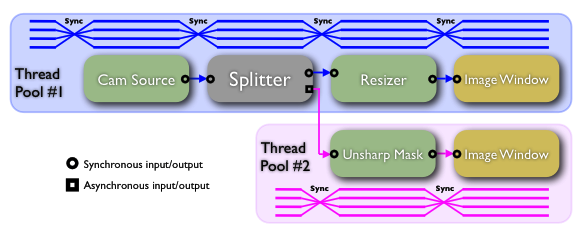
Each stream has one or more thread pools
A thread pool is a set of threads created and managed by a single controller module
The controller is able to assign tasks to individual threads
When a thread finishes the execution of the assigned task, the thread pool controller takes control again
In cisstStereoVision, the thread pool controllers in streams are called
svlStreamManagerThreads of the
svlStreamManagerare synchronized to perform simultaneous processing on filtersAt any time, each thread is assigned the same task to execute
In the source code, tasks are implemented inside a
Process()method in every filterConsequently, at any given time, each thread in the thread pool is executing the
Process()method of the same filterWhen all threads finished executing the
Process()method, thesvlStreamManagerinstructs the threads to start executing the next filter’sProcess()methodThreads get synchronized between every two filters, so that no thread may run ahead or fall behind the others
A stream may have more than one thread pool in it, all of which are controlled by the same
svlStreamManagerThese additional thread pools are created for each async-output to sync-input connections in the stream
Threads in different thread pools are not synchronized to each other, therefore stream branches run on their own thread pools independently from other branches
Connection Types
Output |
Input |
Thread Control |
Sample Transfer |
Efficiency |
|---|---|---|---|---|
Sync |
Sync |
Same thread pool |
Sample object pointer |
Instantaneous |
Async |
Sync |
Async-output creates new thread pool for the stream branch |
Sample deposited into the sample buffer of the Async-output |
Sample is copied into the buffer; Sample processing will start right after the branch finishes processing the current sample |
Sync |
Async |
Receiving filter already has to have it’s own thread pool that is associated to its Sync-input |
Sample deposited into the sample buffer of the Async-input |
Sample is copied into the buffer; Sample will get processed next time the receiver filter’s |
Async |
Async |
Both filters already have their thread pools associated to their Sync connections |
Sample deposited into the sample buffer of the Async-input |
Sample is copied into the buffer; Sample will get processed next time the receiver filter’s |
Filters
Filters are C++ classes derived from
svlFilterBaseclassThe ‘’’Filter’’’ is the unit of processing element in the stream
Filters have inputs and outputs
Filters have states:
State |
Description |
Transition IN |
Transition OUT |
|---|---|---|---|
|
Filter object is instantiated |
Standard C++ object instantiation |
Standard C++ object deletion |
|
Filter is configured for operation |
Using the filter’s custom API |
N/A |
|
Filter is connected on it’s input(s) and output(s); ready for |
|
Coming soon |
|
Filter input/output data samples are initialized; ready to |
|
|
|
The filter’s |
|
|
Available Filters (as of 04-18-2011)
Displaying Images and Handling User Inputs
The cisstStereoVision library has a built in filter called svlFilterImageWindow to display image data at any given stage of the stream. The image window filter provides a transparent, platform independent abstraction of window management. In order to handle keyboard and mouse inputs inside the image window, the user may register a event handler object to the filter that will receive callbacks upon user events. For more information on the image window filter and user input handling, see the page svlFilterImageWindow.
Implementing Filters
Every filter of the cisstStereoVision library is derived from the base class svlFilterBase.
For information on thread synchronization in filters, see Thread Synchronization Macros
Stream Branches
The cisstStereoVision library supports multiple parallel-running stream branches within one stream
Branches can be created by any filter by adding asynchronous outputs:
Branch is created automatically when the async output gets connected to a sync input
If output is connected to an async input, branch is not getting created since there is no direct processing triggered by either connector (see Filter Inputs and Outputs above)
The branch root is the asynchronous output from which the branch is originated
As the name of the asynchronous output implies, the branch will run in parallel with the parent branch without much synchronization:
It has its own thread pool
Synchronized to the parent branch only when it finishes processing a sample and requests a new sample from the branch root
Built in stream splitter filter is called svlFilterSplitter that can be used to divide any stream into multiple asynchronous streams